Playing games
Running cartridges
To play a Game Boy, Game Boy Color, or Game Boy Advance game, insert the game cartridge and select Run Cartridge from the Main Menu.
Warning
To avoid data loss, only insert and remove game cartridges while the device is off or in the Main Menu.
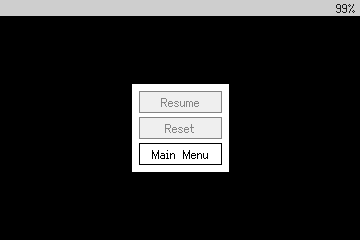
Press Home to enter the in-game menu, where you can reset the game or return to the Main Menu. Make sure to save your progress in the game before exiting!
Loading ROMs
You can also optionally use a microSD card to load homebrew game ROMs. First, format your microSD card with FAT32 (not exFAT) using MBR (not GPT), and insert it into the microSD slot while the device is off.
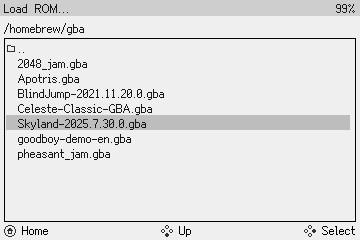
Then, turn on your Game Bub and select Cores from the Main Menu. Use the D-Pad to select the core and browse for the game you want to play, and then press Confirm to load it.
Custom BIOS files
The original Game Boy, Game Boy Color, and Game Boy Advance BIOS files are copyrighted by Nintendo and cannot be legally redistributed.
Instead, the Game Bub's built-in cores ship with free, open-source BIOS replacements (GB and GBC derived from SameBoy, GBA derived from Cult-of-GBA/BIOS).
In addition to not showing the classic system boot screen, these replacement BIOSes have other limitations:
- GBC: does not support Game Boy compatibility mode palette selection
- GBA: does not support the "multi-boot" feature
- GBA: incompatibilities cause bugs in certain games
While the original files cannot be distributed with Game Bub, you can supply them yourself via the microSD card.
Create a directory called system on the root of the microSD card, and add the original BIOS files there.
| System | File Name | Size (bytes) | Official BIOS hash (SHA-1) |
|---|---|---|---|
| GB | gameboy.bios-dmg.bin |
256 | 4ed31ec6b0b175bb109c0eb5fd3d193da823339f |
| GBC | gameboy.bios-cgb.bin |
2304 | 1293d68bf9643bc4f36954c1e80e38f39864528d |
| GBA | gba.bios.bin |
16384 | 300c20df6731a33952ded8c436f7f186d25d3492 |