Settings
To change device settings, open the Main Menu and select Settings.
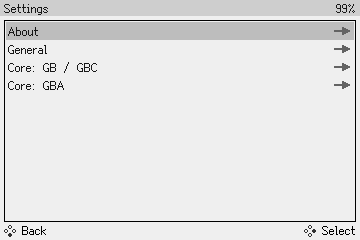
About
The About section shows information about your device's hardware and software.
If the Game Bub is plugged into a Dock, it will also show information about the Dock.
General
- Date and Time (UTC): Adjust the system's date and time, in UTC.
- Press Confirm to start editing, use the D-Pad to modify, and press Confirm again to save the modified time.
- Startup Action: change the behavior of the device at boot
- Main Menu (default): open the main menu
- Run Cartridge: skip the menu, immediately run the inserted game cartridge
Core: GB / GBC
This section controls the built-in Game Boy and Game Boy Color core.
- Enable GB Mode: Set the emulated device model
- Off (default): emulate a Game Boy Color (CGB)
- On: emulate an original Game Boy (DMG)
- GBC Color Corrections: set the color correction profile used in Game Boy Color mode
- None: no color corrections (sRGB)
- GBC (default): Game Boy Color
- GBA: Game Boy Advance
- GBA SP: Game Boy Advance SP
- GB Color Palette: set the color palette used in Game Boy mode
- Grayscale: shades of gray
- DMG Green: bright green, like the original Game Boy (DMG)
- GB Pocket: soft green, like the Game Boy Pocket
Core: GBA
This section controls the built-in Game Boy Advance core.
- Color Corrections: set the color correction profile
- None: no color corrections (sRGB)
- GBA (default): Game Boy Advance
- GBA SP: Game Boy Advance SP
- NDS: Nintendo DS (original)
- NDS Lite: Nintendo DS Lite
- NSO GBA: alternate Game Boy Advance (from Nintendo Switch Online)
- Enable Game Boy Player: Emulate the Game Boy Player. This enables rumble in supported games. However, GBA Video cartridges will refuse to work.
- Off (default): disable Game Boy Player emulation
- On: enable Game Boy Player emulation
- Warn about missing BIOS: Show a compatibility warning if no GBA BIOS was found when launching a game
- Off: disable the warning
- On (default): enable the warning